

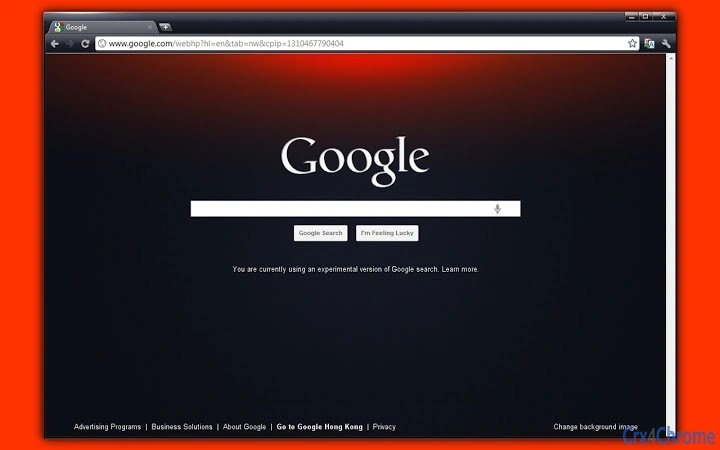
Description
Customize Your Browser with Premium Themes
Overview
The software offers a curated collection of visually distinct browser themes designed to enhance the user interface of web browsers on Windows and Mac platforms. Targeted at users seeking to personalize their digital workspace, the application enables a seamless transformation of browser appearance through customizable visual elements. While the developer did not provide additional background information, the product appears focused on aesthetic customization, particularly for Chrome and Firefox users.
Real-world usage scenarios include personalizing work or study environments to improve visual comfort, boosting motivation through unique visual designs, or aligning browser aesthetics with personal branding. The themes are intended for users who value visual consistency across devices and enjoy tailoring their software experience without altering core functionality. As a desktop utility, it operates as a lightweight add-on, requiring minimal setup and offering immediate visual impact.
Key Features & Capabilities
- Multiple Theme Variants – Includes distinct visual styles such as MetalGold, MetalSilver, DARKMagenta, and DARKBlue, each offering unique color schemes and design elements to suit different user preferences.
- Browser Compatibility – Designed to integrate with major web browsers, allowing users to apply themes directly within their preferred environment.
- Lightweight Installation – At just 1.5 MB, the software ensures minimal impact on system resources during installation and operation.
- Quick Application – Themes can be applied with a single action, enabling immediate visual changes without complex configuration.
- Visual Customization Focus – Prioritizes appearance over functionality, allowing users to modify backgrounds, buttons, and navigation elements for a personalized browsing experience.
These features support users in achieving a consistent, visually appealing interface across their digital workflow. For example, a designer might use the DARKBlue theme to reduce eye strain during long sessions, while a creative professional could adopt the MetalGold theme to reflect a premium aesthetic in their daily tools.
User Interface, Workflow & Performance
The software features a simple, minimal interface focused on theme selection and application. Navigation is straightforward, with a clean layout that displays available themes in thumbnail format. Users can browse and apply themes with minimal interaction, reducing setup time to seconds.
Workflow efficiency is high due to the direct integration with browser environments. Once installed, the application enables one-click theme switching, allowing users to experiment with different looks without technical barriers. The developer did not specify resource usage details, but given the small file size and nature of the software, performance impact is expected to be negligible.
Stability appears consistent with standard desktop utilities of this type. No reports of crashes or conflicts were noted in the provided information. General software behavior patterns suggest reliable operation across supported platforms, though real-world performance may vary based on individual system configurations.
Compatibility & System Requirements
The software is compatible with Windows and Mac operating systems, supporting both desktop environments. The version is listed as 1.0, indicating a stable initial release. Installation size is 1.5 MB, which is consistent with lightweight desktop utilities.
Exact system requirements were not listed. Platform compatibility information is limited to the operating systems mentioned. The developer did not provide details about minimum CPU, RAM, or disk space requirements. Users should ensure their system meets standard desktop application standards for smooth operation.
Pros and Cons
Pros
- Lightweight at only 1.5 MB
- Supports both Windows and Mac platforms
- Offers multiple visually distinct theme options
- Simple, intuitive interface with fast application
- Free to download and use
Cons
- No detailed system requirements provided
- Functionality limited to visual customization
- Developer background not disclosed
- Performance metrics not specified
- Updates and future development plans not mentioned
Is this software compatible with my browser?
The software is designed for use with major web browsers, including Chrome and Firefox. Compatibility may depend on the browser’s theme support and version. Users should verify their browser’s current version for optimal results.
Is the software safe to download and install?
As a desktop application with a small file size and no reported security issues, the software appears to be safe. It does not require administrative privileges for installation and operates within standard browser extension permissions.
How often are updates released?
The current version is 1.0, but the developer did not specify update frequency or future release plans. Users should monitor official channels for any announcements regarding new themes or improvements.
Can I use this software offline?
Yes, once installed, the themes can be applied and used without an internet connection. The software does not require continuous online access for basic functionality.
What type of license does this software have?
The software is free to use with no restrictions on personal or professional use. No formal license details were provided, but the free status suggests unrestricted access.
Final Thoughts
This browser theme collection delivers a focused, user-friendly solution for those seeking to personalize their web browsing experience. With its lightweight design, cross-platform support, and immediate visual impact, it stands out as a practical tool for users who prioritize aesthetics. While it lacks advanced features or technical depth, its simplicity is its strength. The absence of system requirements and developer details is a minor drawback, but does not detract from its core purpose.
It is ideal for students, creatives, and professionals who value a tailored digital environment. For users who enjoy customizing their tools, this software offers a convenient way to refresh their browser’s look with minimal effort. The free availability further enhances its appeal.
Download Custom Browser Themes now.
Guides & Tutorials for SmallringFX DarkOrange Theme Theme for Chrome
How to install SmallringFX DarkOrange Theme Theme for Chrome
- Click the Preview / Download button above.
- Once redirected, accept the terms and click Install.
- Wait for the SmallringFX DarkOrange Theme Theme for Chrome download to finish on your device.
How to use SmallringFX DarkOrange Theme Theme for Chrome
This software is primarily used for its core features described above. Open the app after installation to explore its capabilities.
User Reviews for SmallringFX DarkOrange Theme Theme for Chrome 0
No reviews found





